The Tails project has released Tails 7.15.1, an emergency security update addressing a compromised certificate authority that could allow attackers to impersonate legitimate HTTPS websites. Released on October 23, 2026, the update focuses on protecting users against a potentially serious man-in-the-middle attack involving certificates associated with eMudhra, an authority whose intermediate certificates were compromised.
The emergency release updates Tor Browser to version 15.0.26, addressing CVE-2026-113470, and modifies the distribution’s trusted certificate authorities to block all eMudhra certificates. These changes are particularly important for Tails because the operating system routes internet traffic through the Tor network, where malicious exit nodes or other network intermediaries could potentially exploit compromised certificates to impersonate secure websites.
Unlike a conventional maintenance update, Tails 7.15.1 does not introduce major desktop features, new applications, or significant interface changes. Its purpose is to close a security gap that could undermine the authenticity of HTTPS connections. The developers recommend upgrading promptly, especially for users who rely on Tails for sensitive communications, anonymous research, journalism, or other privacy-critical activities.
Why Tails 7.15.1 Was Released as an Emergency Update
Tails, short for The Amnesic Incognito Live System, is a Debian-based Linux distribution designed to help users preserve their privacy and reduce traces of their computing activity. It typically runs from a USB stick and routes internet connections through Tor, making it useful for people who need stronger privacy protections than those provided by a conventional desktop operating system.
The distribution also emphasizes minimizing persistent data. By default, Tails operates as a live environment and does not retain ordinary session activity after shutdown. Users who need to preserve selected files and settings can configure encrypted Persistent Storage on their USB device, allowing them to maintain important information across sessions without changing the operating system’s general amnesic behavior.
Because Tails is built around privacy and secure communication, problems involving HTTPS certificate validation deserve particular attention. Tor helps obscure the relationship between a user’s network location and the websites they visit, but it does not automatically guarantee that every website encountered through an exit node is authentic. HTTPS provides an additional layer of protection by authenticating websites and encrypting communications between the browser and the destination server.
Sovereignty is a word borrowed from statecraft. A sovereign country is independent in its decisions. The term “digital sovereignty” is a more recent invention that applies to organizations and even individuals.
In this article, I discuss what the push for digital sovereignty implies for Linux-focused, open source developers and companies. The framework I use is a European one, because I am Vienna-based and familiar with it. As I discuss later, the implications are not limited to Europe.
A framework for defining and rating digital sovereignty
SOV-1, Strategic: Ownership and governance are controlled, avoiding external dependencies.
SOV-2, Legal and Jurisdictional: Protects against external laws and unauthorized access.
SOV-3, Data and AI: Control and privacy compliance for data and AI models in the cloud.
SOV-4, Operational: Day-to-day cloud administration, management, and support are handled securely from within.
SOV-5, Supply Chain: Protects against vendor lock-in and external bottlenecks.
SOV-6, Technology Openness: Encourages open standards and the freedom to choose technologies.
SOV-7, Security and Compliance: Aligns cloud services with European cybersecurity standards, frameworks, and compliance audit rules.
SOV-8, Environmental Sustainability: Adoption of energy-efficient infrastructure, environmentally responsible practices, and activity reporting intended to reduce environmental impacts of technological activity.
Rating technology providers for digital sovereignty compliance
The framework rates providers on two scales: a Sovereignty Effectiveness Assurance Level (SEAL), and a complementary Sovereignty Score for cloud services. The first indicates a minimum level of sovereignty objectives met. The second shows a provider’s strengths and weaknesses across the objectives.
Each objective is rated from SEAL-0 to SEAL-4. SEAL-4 means an EU supply chain, from the physical chips up to the software.
The mechanic I find most interesting is that a provider does not get one SEAL level. It receives eight, and the overall level is the lowest of them. Your weakest objective decides your rating, not your average. Anyone who has ever tuned a storage stack will recognize that logic.
Meeting the technology-openness objective
Open source software can put providers in a strong position to address the technology-openness objective, SOV-6, because customers can inspect the code, operate it independently, and avoid dependencies on proprietary implementation. Because the source is open, that argument does not stop at the EU border. A service provider in the US or in Asia aiming for full SEAL-4 is not held back by choosing open source software.
Open standards need open implementations
SOV-6 specifies two things: open standards and the freedom to choose technologies. In software, an open standard might define an interface that anyone can implement, but if only one vendor has implemented it, a buyer still has a single supplier for it. Depending on a single supplier also weakens a provider on SOV-5, the supply-chain objective, which protects against vendor lock-in. Freedom to choose means being able to substitute one implementation for another.
An example is the Container Storage Interface (CSI), a vendor-neutral storage standard developed under the Cloud Native Computing Foundation (CNCF) and used by Kubernetes. CSI is the standard, LINBIT provides a CSI driver for LINSTOR® and its upstream CNCF project, Piraeus Datastore, and a buyer running Kubernetes can use this driver. Because of the open standard nature of the interface, the buyer can also move between storage back ends. This is freedom for the buyer, motivation for providers to make a better solution, and neutrality from a foundation like the CNCF.
Implications of digital sovereignty for cloud and technology services providers
What poured oil on the fire was an incident involving the chief prosecutor of the International Criminal Court. After the US sanctioned court officials, the chief prosecutor reportedly lost access to his Microsoft-hosted email account, and bank accounts in the United Kingdom were frozen. Since these actions, some EU banks with US exposure are preferring to over-comply rather than take any risk. Microsoft disputes the framing and maintains it never suspended services to the ICC as an organization. For me, the detail of who pressed which button matters far less than the lesson: neither the email nor the banking depended on a European decision.
In the US, similar discussions have taken place, only with different verbiage. There it is “economic security” and “supply chain resilience”, mostly aimed at China, and where Europe says “technological sovereignty”, Washington says “technological leadership”. Different branding, same substance.
Conclusion
As digital sovereignty gains weight in technology sourcing decisions, smaller vendors benefit.
A framework that asks, “Who owns you? Whose laws apply? Can I operate this without you, and can I read the source?” rewards exactly the properties a small open source company has by default. The hyperscalers will feel some headwind, though they are not standing still, and “sovereign” regions run by local operating entities are their answer. Whether that clears a SEAL-3 or SEAL-4 bar is the argument of the next few years.
LINBIT already made an investment in developing in the open. An open license is necessary but not enough on its own, because a project can be open and still be controlled by a single company that can relicense it. What makes the openness durable is governance that the original vendor cannot reverse. DRBD® ships in the mainline Linux kernel, and we are working to upstream the current DRBD 9 code. Code in the commons, for example, in the mainline kernel, under a foundation such as the CNCF, or in another home that no single vendor controls, is the strongest answer to SOV-6 I know of. Every project that puts it there widens the set of technology a sovereign buyer can choose from.
Docker and the CNCF will partner on an open spec to make agent permissions portable
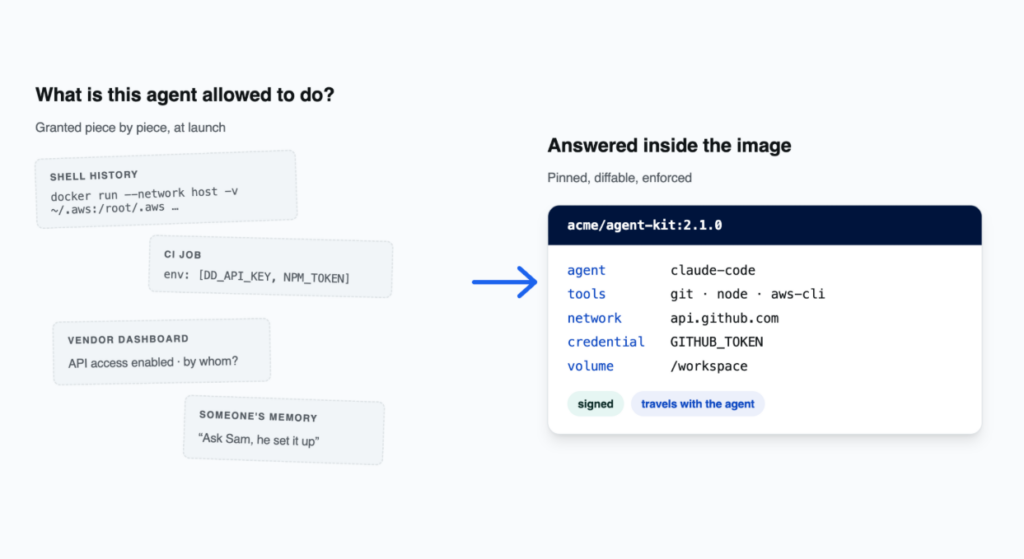
Docker Sandbox Kits let you package an AI agent together with exactly what it is allowed to do, so anyone can pull the same agent with the same limits, review changes to those limits, and enforce them. Now, Docker has published the Docker Sandbox Kit Spec, the open specification behind Kits, under Apache 2.0 and is committing to contributing the spec to the Cloud Native Computing Foundation for neutral governance.
A Kit is an ordinary OCI container image that carries three things: the agent, the tools it uses, and a typed list of everything it asks to reach, such as network hosts, credentials, and volumes. That list lives inside the image, so pinning the image pins the agent and its requests together. A Kit builds, pushes, pulls, signs, and scans like any container image, because it is one.
“Standards are what let an ecosystem move fast without fragmenting, and few companies understand that better than Docker. By delivering Sandbox Kits as standard OCI images, Docker is giving the industry an open, repeatable way to package an AI agent, its tools, and its guardrails as one artifact. OCI is the foundation the cloud native ecosystem is built on, so a standard for agents that builds on OCI reaches the whole ecosystem at once. The CNCF welcomes this, and we’re excited to work with Docker and the community on making it broadly adopted.”
Chris Aniszczyk, CTO of the CNCF
Why the OCI image is not enough on its own
An OCI image tells a runtime how to build and start a piece of software. It has no place to state which hosts that software may call, which credentials it may use, or which files it may keep between runs. Those decisions are made outside the image, at launch: in docker run flags, a Compose file, a CI job, an onboarding doc. For a web service, that was fine. The program was fixed, it needed a network and a port, and the flags rarely changed.
Agents are different. Claude Code and Codex decide at runtime what to do: install packages, call APIs, use credentials, change the environment they run in. So the access they need is granted piece by piece, by hand, usually to get a task unblocked. A few months in, nobody can answer a simple question: what is this agent allowed to do? The answer is spread across shell history, dashboards, and someone’s memory, and it cannot be handed to a teammate or compared with last week.
Every team answers that question on its own today, and every runtime vendor could ship its own format for the answer. That is the fragmentation OCI was created to prevent, and it is why Docker is now proposing one artifact, built on OCI, governed in the open by the CNCF community.
How a Sandbox Kit Spec fills the gap
The Sandbox Kit Spec does not fork or replace any OCI specification. It uses the annotation extension point OCI already defines to carry the agent’s requests in the image manifest. Nothing in a registry, scanner, or signing tool needs to change.
Kits began as a feature of Docker Sandboxes, Docker’s product for running agents inside isolated microVMs, where a Kit defined one sandbox: the agent, its tools, and what it could reach. The Sandbox Kit Spec turns that definition into a standard OCI image and opens the format so any runtime can implement it. Docker Sandboxes is the first runtime that enforces it. It should not be the only one, and under Linux Foundation governance it will not be.
Two things follow for anyone running agents. The answer travels with the agent: a teammate can pull it, a reviewer can diff it, and a conforming runtime can enforce it. And when a new version asks for more, the change shows up as added lines someone can refuse.
Kits from across the ecosystem
Kits for tools from AWS, Box, Datadog, Dynatrace, JFrog, NanoClaw, OpenClaw, Palo Alto Networks, and Snyk are available now, covering cloud, observability, security, artifact management platforms and more.
That is what a shared format makes possible. A database vendor can publish a Kit that connects any agent to its service with the scope it recommends. An agent maker can publish its own Kit, so the request list comes from the people who built the agent. A platform team can publish one for the company, and every engineer starts from the same place.
Containers made software portable. Kits make authority portable: the set of things you deliberately hand an agent travels with the agent, in the same image, and means the same thing wherever a conforming runtime opens it. Docker looks forward to formally submitting Kits to the CNCF and working with the community to ensure Kits further the goal of secure, reliable agentic AI and AI governance.
Build a Kit
If you make a tool that agents use, publish a Kit for it. If you run agents, start from one and share it with your team. The Docker Sandbox Kit Spec, its capability pages, and a worked tour of a real Kit are available at docker/sandbox-kit-spec. If there is a Kit you cannot express, or a rule a runtime cannot implement, open an issue.
You change one line in a large file. Your “incremental” backup re-uploads the whole thing anyway.
Nine times out of ten, it’s not the network, and it’s not your storage backend. It’s the algorithm deciding where to cut your data into pieces.
Every deduplication system works the same way: split data into pieces, hash each piece, keep one copy per distinct hash. A piece is named after its own content, so two identical pieces are, by definition, the same piece. Snapshot a filesystem today and again tomorrow, and if most of the data hasn’t changed, most pieces are already in the store. The second snapshot costs you almost nothing.
That’s not a nice-to-have. A backup that actually survives an incident needs to be encrypted, frequent, immutable, replicated and verified, and each of those requirements multiplies what you store. When deduplication is weak, those multipliers stack until backing up everything becomes unaffordable, and teams quietly retreat to backing up only what they call “critical.” Good deduplication is what makes backing up everything affordable again.
And all of it rests on one assumption: unchanged data should yield unchanged pieces.
Where fixed-size chunking falls apart
The obvious way to split a file is to cut every N bytes. It’s fast. It also wrecks deduplication the moment you touch the file.
Add one byte near the front and every boundary after it slides over by one. Nothing lines up with where it used to be, so every hash downstream is “new,” so the store treats the entire rest of the file as fresh data. Edit one line in a 40 GB file and you re-upload close to 40 GB of it. Nothing meaningful changed, only the offsets did, and fixed-size boundaries are glued to offsets.
How content-defined chunking fixes it
Content-Defined Chunking (CDC) picks boundaries based on what the data is, not where it happens to sit.
Slide a small window over the byte stream and keep a rolling hash, cheap enough to update incrementally that the whole scan stays linear, then cut a boundary wherever that hash matches an agreed pattern.
Now insert a byte. The boundaries right around the edit shift. But once the window slides past the change, the hash sequence goes back to matching what it was before, and the boundaries fall back into place on their own. One piece changes. Everything else deduplicates cleanly against the previous snapshot. That self-resynchronizing behaviour is the whole point of CDC.
Picking an algorithm
There’s more than one way to build a rolling hash and a cut rule.
Rabin fingerprinting is the textbook original, correct but slow and allocation-heavy by today’s standards. FastCDC swapped the polynomial hash for a much cheaper Gear hash and normalized the chunk-size distribution, and it became the field’s workhorse. UltraCDC trades a bit of speed for fewer, larger chunks. JC is a newer design that turns out to be strikingly fast. There are also keyed variants, where the hash table is seeded from a secret so two different stores cut the same data at different points, which matters if you care about not leaking which chunks you hold.
We benchmarked these in go-cdc-chunkers, the open-source chunking library behind our backup engine, Plakar, on 1 GiB of random data, the worst case since there’s no structure to exploit. JC hits 3747 MB/s, comfortably ahead of the Gear-based FastCDC variants. Rabin runs about 7.5x slower and allocates roughly 3.3 MB per operation versus a few KB for the others, which on a busy host is the difference between a run you notice and one you don’t. Full benchmarks and charts are published separately.
Using it is trivial:
// One interface for the whole family.

c, _ := chunkers.NewChunker("jc", reader) // or "fastcdc", "ultracdc", "kfastcdc"

for {

    chunk, err := c.Next()

    // ... hash and store the chunk ...

    if err == io.EOF {

        break

    }

}
Determinism is the feature that matters most
Here’s the part that gets too little respect.
Give it enough time and “FastCDC” stops meaning one thing. Every implementation picks up small departures from the paper: a mask off by a bit, a window starting a byte early, a threshold nudged for taste. Harmless for a benchmark. For a storage system it’s a slow-motion disaster, because boundaries are part of your data’s identity. Change how you cut and yesterday’s pieces stop matching today’s, so deduplication degrades with no error and no warning. The store just grows faster than it should.
The fix is to publish spec-faithful, explicitly versioned variants and treat the version number as a promise: a given version cuts a given input the same way, on any machine, forever. Improvements ship under a new name people adopt on purpose, so nothing re-cuts existing data out from under anyone. Versioning also buys you cross-language conformance vectors, published inputs with expected boundaries that any implementation, in any language, can check itself against, byte for byte. That’s what turns “spec-faithful” from a claim into something you can actually test.
So whatever you pick, hold out for two things: a pinned, versioned spec of exactly how boundaries get computed, and published test vectors you can verify yourself. Speed is negotiable. Determinism isn’t.
Why we built this in the open
go-cdc-chunkers is open source for the same reason all of Plakar is. Backup is a trust problem before it is a technical one: you hand one system the single copy of your data meant to survive everything else, yet with most products you cannot read the code, review the cryptography, or verify the recovery path until the day you need it. Open source is the only honest answer I know, and it is the one I took from years on OpenSMTPD and OpenBSD: formats outlive vendors, a backup you cannot open in ten years is not a backup, and the community that reads the code is part of the security model.
Try it yourself
To see the deduplication effect directly, you can reproduce the experiment with an open source backup implementation that uses CDC. The following example uses Plakar.”
On macOS, brew install plakarkorp/tap/plakar; on any platform with Go 1.23.3 or newer, go install github.com/PlakarKorp/plakar@latest. Prebuilt binaries, apt and AUR packages for every platform are on the download page.
Create a local store (Plakar calls it a Kloset). It will prompt for a passphrase, since everything is encrypted before it touches disk:
plakar at $HOME/backups create
Now back up a directory:
plakar at $HOME/backups backup $HOME/Documents
The last line of the output tells you what happened:
info: backup: created unsigned snapshot dd62691d of size 6.4 KiB in 125ms (wrote 577 KiB)
Two numbers matter there: the logical size of what you backed up, and the bytes actually written to the store. Now the part that shows CDC working. Change one file, add a paragraph to a document, then run the exact same backup command again. You get a new, self-contained snapshot, but the bytes written the second time are a small fraction of the first, because every chunk that did not change was already in the store and is simply referenced rather than rewritten. Insert a few bytes at the top of a large file and the diagram above becomes concrete: the chunks after the edit resynchronise and deduplicate against the first snapshot instead of being stored again.
You can list snapshots, verify one is intact, then restore it somewhere else:
plakar at $HOME/backups ls
plakar at $HOME/backups check dd62691d
plakar at $HOME/backups restore -to $HOME/restored dd62691d
If you would rather look before installing anything, a public instance of the web UI runs at https://demo.plakar.io with real backups to browse.
Resources
It’s all open source: the chunking library is go-cdc-chunkers and the backup engine is Plakar, with the full v1.1.0 benchmarks published for anyone who wants to reproduce them.
Gilles Chehade is a long-time OpenBSD developer and the co-founding CTO of PlakarKorp. He createdPlakar.io as a personal tool in 2015 before turning it into an open backup platform that gives security and infrastructure teams “resilience as code.”
By Alexey Volkov, Bo Li, Ben Chen, Maksym Yezhov, Pete Luferenko, and Volv Grebennikov – Shopify
Machine learning work is full of loops: form a hypothesis, build a pipeline, run it, read the metrics, adjust, repeat. Tangle is already where Shopify’s ML experiments run, giving engineers a shared platform to build and execute pipelines.
Tangent is an autonomous agent that orchestrates ML experimentation workflows on top of Tangle, deciding what to run, running it, and reporting back. Around Tangent we built a Linux-based platform for hosting these agents securely so they can persist, work remotely, and reach the services they need without ever holding a credential. This is done using containerized isolation, a certificate-issuing proxy, and per-instance persistent storage (details below).
What is Tangle?
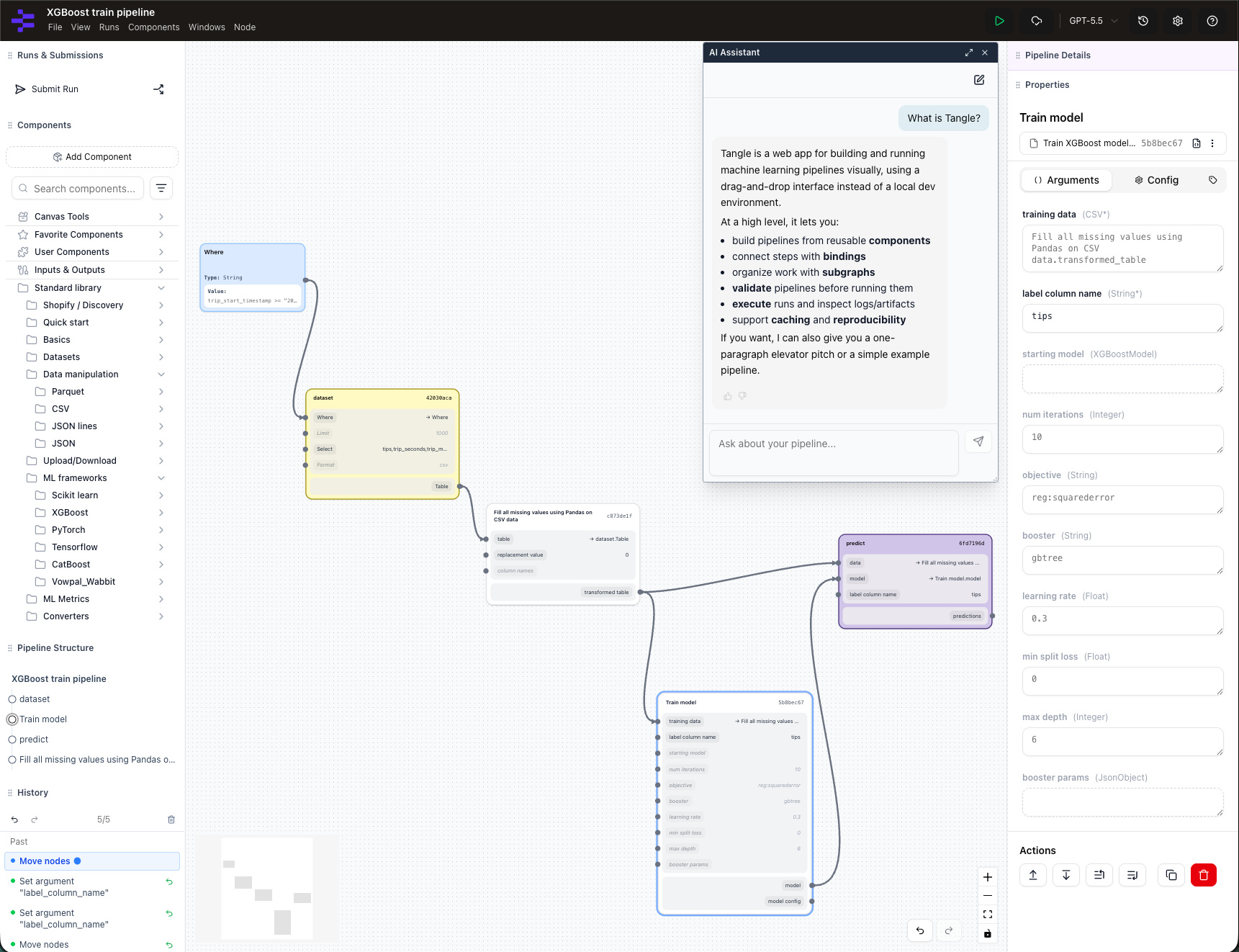
Tangle is an open source, platform-agnostic ML experimentation platform with a powerful drag-and-drop visual editor. Users drag components onto a canvas, wire outputs to inputs to form a pipeline graph, and submit it for execution locally or in the cloud. A caching layer skips or reuses previously executed steps, including steps still in flight, so iteration is fast and cheap. All pipeline runs are stored forever (including graphs, components, and logs), making pipelines reproducible even after years have passed.
Because runs and caches are shared, teammates can inspect, copy, and modify each other’s pipelines in seconds, with no cloning a private notebook and hoping the environment matches. Tangle has similarities with other OSS tools like Airflow and Kubeflow Pipelines; its caching model and visual editor are what make fast experimentation loops possible. Any containerized CLI program written in any language can be used as a Tangle component, and those components exchange data as files in any format (CSV, Parquet, JSON, etc.).
Tangle composes components the way shell scripts, makefiles, and *nix pipes do. More information about Tangle is available at tangleml.com and you can immediately try it out.
Tangle’s pipeline canvas and architecture.
What is Tangent?
Tangent is an autonomous ML engineering agent designed to accelerate your Tangle experimentation workflows. It follows the pattern Andrej Karpathy recently popularized as autoresearch. Tangent takes that idea from a single training script on one GPU to full experiment pipelines running on Tangle, with a fleet of specialized subagents, gated checkpoints, and persistent memory. You point it at a scenario, a model, a metric to improve, a dataset, and it iterates: it analyzes results, forms hypotheses, modifies pipelines, submits runs, monitors them, and synthesizes what it learned. How much you delegate is up to you. Tangent works interactively, so you can hand it a single step (build this component, debug this failed run, analyze these metrics), or you can hand off the entire loop with one command and let it run:
tangent auto
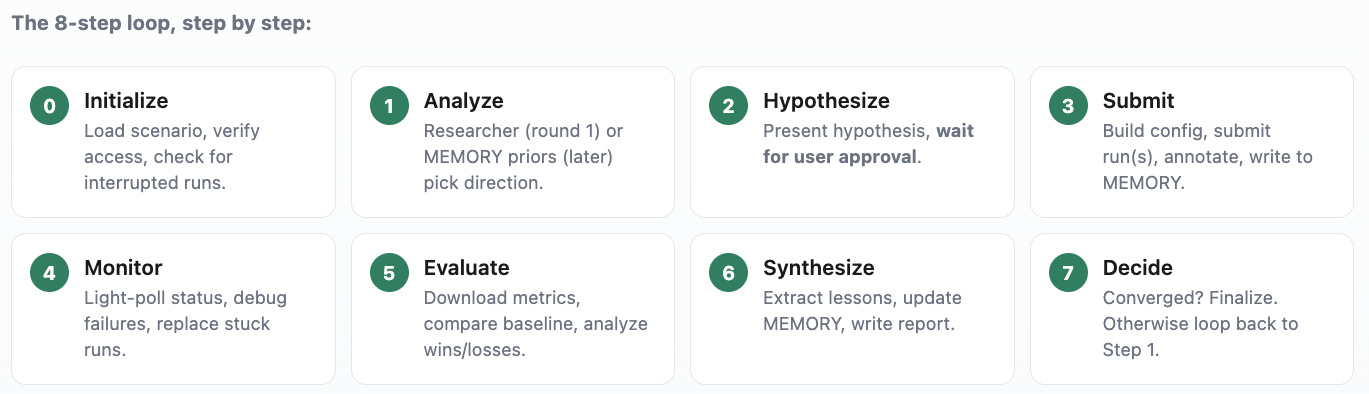
Screenshot of the eight-step loop progressing.
Under the hood is an eight-step loop with gated checkpoints. The agent won’t advance until every item on a step’s checklist passes, and it reloads its instructions and context at each gate so it doesn’t drift over a long run. Memory is persistent and plain-text: a MEMORY.md holds the best-known configuration and hard-won lessons; daily session logs capture the play-by-play, and per-run learnings are archived to object storage.
The Tangent Skill
Tangent’s brain is a skill, written in Markdown. The entry point is a single SKILL.md, backed by a fleet of subagent skills: a researcher, a builder, a debugger, a reviewer, and more. Because skills are just files, they’re portable, reviewable in a pull request, and harness-agnostic, the same skill drives whichever coding agent you prefer.
That portability matters because Tangent runs on open agent harnesses instead of one proprietary client. To add a capability, you write a Markdown file and commit it. There is no binary to build or ship. Markdown was chosen deliberately over a config format or DSL: it’s diffable in a normal PR, requires no schema or parser to validate, and both humans and the coding agent read it natively. The skill file doubles as its own documentation.
# Tangent
A skill is just Markdown. This file is the entry point; each subagent is
its own Markdown file, loaded on demand.

## Commands
tangent <subagent>   Read agents/<subagent>.md and follow it.
tangent auto          Run the autonomous 8-step experiment loop.

## Subagents                Agent file
tangent builder             agents/builder.md
tangent debugger            agents/debugger.md
tangent researcher          agents/researcher.md
tangent reviewer             agents/reviewer.md
tangent reporter            agents/reporter.md

## Auto Mode - the loop
0 Initialize -> 1 Analyze -> 2 Hypothesize -> 3 Submit ->
4 Monitor -> 5 Evaluate -> 6 Synthesize -> 7 Decide -> (loop)

Each step has a gate. The agent won't advance until every item on the
step's checklist passes - and it re-reads its instructions at each
gate so it doesn't drift over a long run.
Tangent Agent Hosting Platform
Our Tangent Agent Hosting Platform helps users deploy persistent Tangent instances that communicate with Tangle, cloud providers, and other external services. Each Tangent instance is a multi-agent space: a Linux-based VM/container that can host multiple agentic apps (TUI, API, WebUI). Because every Tangent component runs as a standard Linux process inside a container, Tangent inherits mature Linux networking, storage, and isolation primitives instead of introducing a custom runtime. Instance data (like agent sessions and memories) is persisted across restarts. There are also cross-instance shared memories.
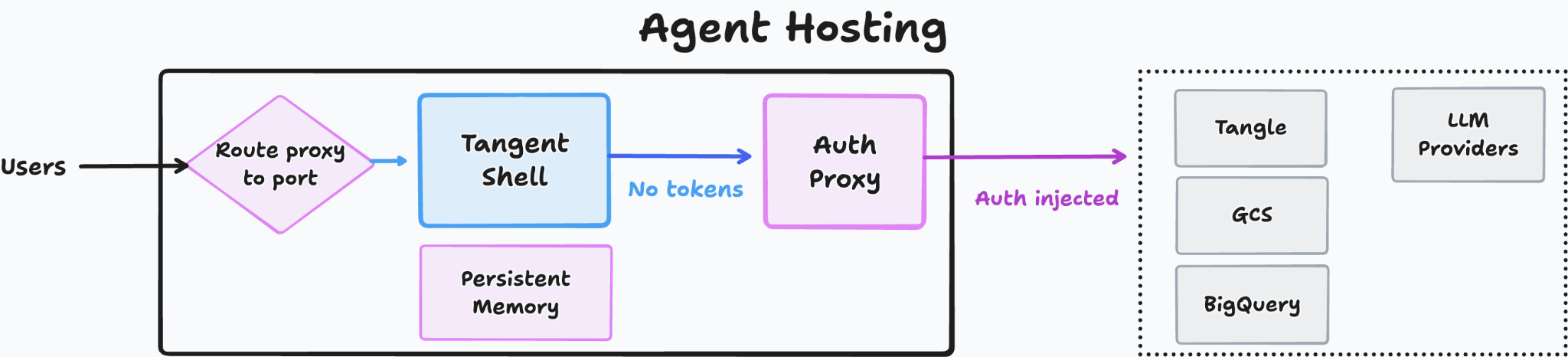
Agent Hosting architecture: Tangent Shell and Auth Proxy routing requests without exposing tokens.
Auth Proxy
Agents need access to services, but there is always a risk of agents reading the credentials and leaking them to AI providers. Tangent solves this by adding a system-wide proxy which lives in a separate container. The proxy intercepts and modifies HTTP requests coming from the agentic tools. Auth proxy automatically adds auth headers and can modify request URLs (e.g. redirect api.aicompany.com to some AI proxy). To modify HTTPS requests, auth proxy creates new SSL certificates on the fly. The agent container’s OS and programs are configured to trust those certificates via a generated certificate authority.
Implementation details
In the Kubernetes version, each instance is a StatefulSet: a container Pod running agents, apps, and proxies, backed by a per-instance PersistentVolume and a shared memory volume mount.
Tangent Shell
To work natively with Tangle, we built a custom Agent Host image. The Tangent Shell is an environment where agents run remotely, keep their memory and sessions across restarts, and keep working long after you close your laptop. Tangent Shell orchestrates multiple agents: it splits a request into slices, delegates them to parallel sub-agents, and coordinates results through a Prime agent that owns the session.
Tangent Shell is built to meet the ML expert’s needs. Each session boots pre-loaded with the Tangent skill toolkit and Tangle API tools, instructed to assist with Tangle-based ML experiments: building and optimizing ML training pipelines, testing hypotheses, ablation studies, hyperparameter optimization, etc. With the help of triggers (like webhooks, timers, and schedules), Tangent Shell is able to monitor pipeline executions and implement deep experimentation plans. The agent knows how to operate inside the rich UI, and how to render visual artifacts (Markdown, PNG, HTML).
The Shell is open source. Agent Bundles (packaged sets of prompts, tools, skills, workflows, and triggers) extend it without touching core code.
A real use case
We used Tangent to rebuild a large reranking model end to end. An engineer set the direction (which features to try, what training data to add) and reviewed results at each step. Tangent built, ran, and analyzed the experiments. Working through the loop, it tried a sequence of changes and measured each one against the previous best:
Step
What the agent changed
R@90% prec.
R@95% prec.
R@97% prec.
Previous pipeline
Prior distillation training, standard features & data
67.3%
54.4%
33.6%
+ Standardized pipeline
Migrated onto a reproducible trainer (on par; enables fast iteration)
69.5%
51.9%
35.2%
+ Richer product features
Added structured metadata, taxonomy, text descriptions, and predicted attributes (biggest single lift)
71.3%
58.7%
48.5%
+ More & harder training data
Added search-derived, sampled, and hard-negative pairs
75.6%
60.2%
43.9%
Open source and contributing
Tangle, the Tangent skills, the Hosting Platform, and Tangent Shell are all released under Apache 2.0. Development happens in the open on GitHub, and the projects accept pull requests for new subagent skills, Agent Bundles, and core fixes. Tangle is maintained by its creator, Alexey Volkov, with Shopify as the project’s initial sponsor and infrastructure steward. If you build a subagent skill or Agent Bundle you think others would find useful, we welcome the PR.
In the late 1990s, the DHCP (Dynamic Host Configuration Protocol) quietly catalyzed a revolution in digital connectivity. Before DHCP was introduced, connecting devices to a network involved manual entry of IP addresses, DNS servers, subnet masks, and gateways. Networks were fragile, prone to errors, and severely limited in scalability. The introduction of DHCP changed everything and became a game-changer for networking.
With widespread adoption across operating systems, DHCP made networking a plug-and-play experience. This fundamental change accelerated the adoption of Wi-Fi, standardized enterprise networks using DHCP-based addressing, and propelled the mobile Internet to viability. While DHCP simplified network connectivity by automating IP address assignments, it also introduced the world to the essence of effortless connectivity.
Fast forward to today, connectivity remains effortless, yet escalating threats continuously challenge digital trust. Just as DHCP revolutionized connectivity, we are primed for a transformation of equal magnitude concerning digital trust. The solution is clear: we must automate trust through Secure Zero-Touch Provisioning (SZTP).
SZTP: Secure Zero-Touch Provisioning
Modern digital infrastructure, spanning cloud nodes, edge systems, IoT sensors, industrial robotics, home gateways, and AI-centered factories, necessitates robust security measures. To maintain secure environments, each device in this extensive ecosystem must autonomously verify its needs. This includes self-authentication, receiving verified firmware, installing necessary credentials, and joining orchestrated environments without human intervention, which DHCP alone cannot accomplish.
Secure Zero-Touch Provisioning (SZTP), as defined in RFC 8572, steps up to address these needs in our complex digital reality. It builds trust by automating the exchange of essential artifacts and certificates required for seamless device bootstrapping: verifying hardware identity, delivering trusted firmware and OS images, applying patches, injecting cryptographic credentials, and setting up a complete runtime environment automatically, without manual interaction.
SZTP is based on open standards, making it vendor-neutral and ideal for large-scale deployments. As digital ecosystems grow in complexity, SZTP promises a future in which AI agents can autonomously request and deploy secure infrastructure within minutes, enhancing operational efficiency and security simultaneously.
Step-by-Step: Implementing SZTP in Your Infrastructure
Device Identification and Authentication
Begin by integrating SZTP in your network infrastructure. Once a device powers on, it must first establish identity through a secure channel. This is typically done using hardware-based security measures, such as a TPM (Trusted Platform Module), to provide hardware attestation.
Firmware Verification and Secure Image Delivery
Implement policies to verify firmware integrity. Use cryptographic signatures to ensure firmware authenticity. SZTP can fetch secure firmware and OS images from trusted repositories. For instance, create a policy that requires all devices to verify their firmware against a centralized manifest.
Credential Injection and Environment Initialization
Devices securely receive cryptographic credentials and configuration files. Use automated scripts to distribute these credentials from a central management server. Next, deploy containerized workloads using tools such as Kubernetes to orchestrate the environment.
Lifecycle Management and Patch Automation
With SZTP, configure automated patch management systems to apply security patches and software updates. Implement CI/CD pipelines that automatically redeploy updated firmware images, ensuring devices run the latest software versions.
SZTP is ideal for AI and Edge Clouds
AI factories rely on specialized processors, such as DPUs, to offload networking, storage, and security tasks from GPUs. Linux Foundation’s OPI project has adopted SZTP as a standard initialization method for these devices.
Here’s how SZTP simplifies AI and edge cloud deployment:
Device Identity and Trust Management
SZTP serves DPUs like DHCP did for laptops, answering questions crucial to trust: “Who are you?” and “Can you be trusted?” Use open-source libraries to develop trust protocols integrated with SZTP, enhancing the security posture.
Automated Secure Provisioning
Ensure your infrastructure is secure by default. Initiate hardware attestation, verify boot components, and use automated tools to deliver secure images and deploy cryptographic credentials. Platforms like HashiCorp Vault can manage secrets during this process.
Comprehensive Software Stack Deployment
SZTP allows for defining a device’s mission by automating the deployment of OS components, runtimes, and security agents. Leverage Docker and Kubernetes to handle container runtimes and orchestration, ensuring efficient management of service mesh layers and logging telemetries.
Scalable Client Implementations
Establish open-source client initiatives to enhance adoption. Encourage device manufacturers and OS vendors to integrate this client to promote SZTP adoption further and reduce integration complexity.
Conclusion
Open clients enabled DHCP to transform networking, and they will guide SZTP in defining secure, automated infrastructure’s next era for AI-enabled applications. Automate your edge and AI factory environments with SZTP, elevating digital trust to unprecedented levels.
By following these steps and leveraging SZTP technology, organizations can enhance their network security, automate deployment processes, and prepare their infrastructure for a future driven by AI and IoT.